Memory Management in Operating System
Concepts, Techniques, Types, and Importance
Introduction
Memory management is one of the most fundamental responsibilities of an Operating System. Every program requires memory to store instructions and data. Since memory is limited and shared among multiple processes, the operating system must manage it efficiently.
What is Memory Management?
Memory management is the process of allocating, tracking, and freeing main memory (RAM) for processes running in a system. It ensures efficient use of memory and prevents processes from interfering with each other.
Objectives of Memory Management
- Efficient utilization of memory
- Isolation and protection of processes
- Fast access to data
- Support for multiprogramming
- Logical view of memory
Memory Hierarchy in Computer System
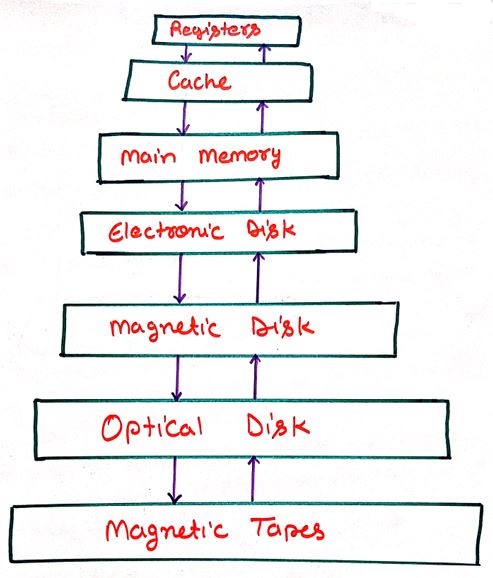
The memory hierarchy represents the organization of different storage components based on speed, cost, and capacity. The diagram below shows how memory is arranged from fastest to slowest in a computer system.
Explanation of Memory Hierarchy
The memory hierarchy is designed to achieve a balance between high performance and low storage cost. As we move upward in the hierarchy, memory becomes faster and more expensive but smaller in size. As we move downward, memory becomes slower, cheaper, and larger in capacity.
Registers
Registers are the fastest storage units located inside the CPU. They store instructions and data that are currently being executed by the processor.
Cache Memory
Cache memory stores frequently accessed data and instructions to reduce the time required to access main memory, thereby improving system performance.
Main Memory (RAM)
Main memory holds active programs and data. It is volatile in nature and loses its contents when the system is powered off.
Electronic Disk (SSD)
Electronic disks provide fast non-volatile storage and are commonly used to store operating systems and applications.
Magnetic Disk
Magnetic disks offer large storage capacity at a lower cost and are widely used for permanent data storage.
Optical Disk
Optical disks are removable storage devices mainly used for data distribution and backups.
Magnetic Tapes
Magnetic tapes are used for archival purposes where large amounts of data need to be stored for a long duration at minimal cost.
Importance of Memory Hierarchy
Memory hierarchy allows the operating system to keep frequently used data in fast memory while storing less-used data in slower storage, resulting in better system efficiency and performance.
Logical Address vs Physical Address
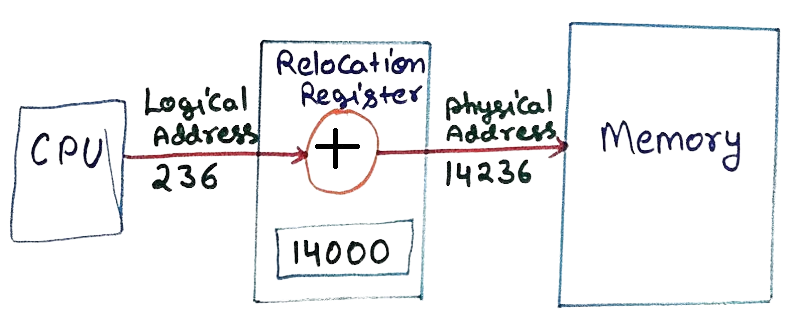
When a program runs in a computer, the CPU does not directly access the real memory location. Instead, it uses a logical address which is later converted into a physical address.
What is a Logical Address?
A logical address is generated by the CPU during program execution. It is a virtual address and does not represent the actual location in memory.
What is a Physical Address?
A physical address is the real address in RAM where the data is stored and accessed.
Role of MMU (Memory Management Unit)
The MMU converts the logical address into a physical address using a base value stored in the relocation register.
Logical Address: 236
Physical Address = Base + Logical = 14236
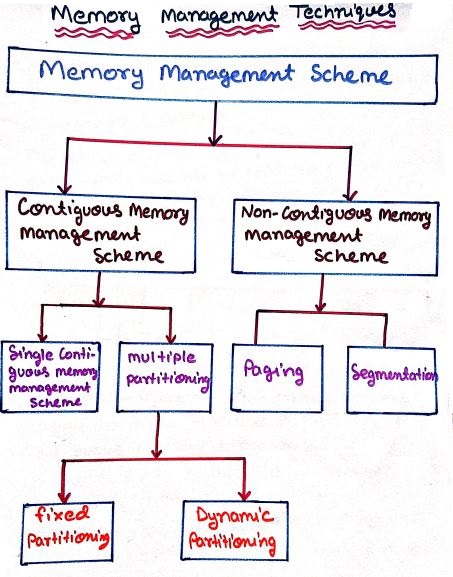
Memory Management Techniques
Contiguous Memory Allocation
Each process is allocated a single continuous block of memory. Although simple, this method suffers from fragmentation. In a computer system, main memory (RAM) is divided into small blocks. When processes are loaded into memory, each process is given a continuous (one after another) space. This method is called contiguous memory allocation.
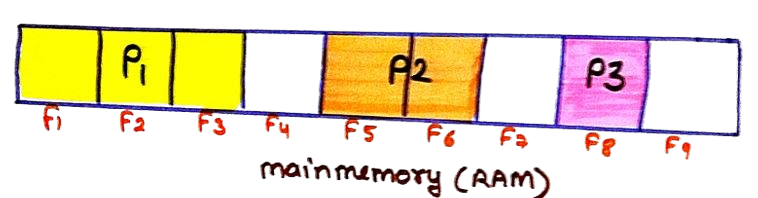
In the diagram, memory is divided into parts labeled F1 to F9. Different processes are placed inside these blocks:
- P1 is stored in the starting blocks (F1–F3)
- Some blocks (like F4) are empty
- P2 is placed in the middle (F5–F6)
- P3 is stored further ahead (F8)
Non-Contiguous Memory Allocation
Processes are divided into parts and stored in different memory locations, improving memory utilization.In a computer system, memory is not always assigned in one continuous block. Sometimes, a process is divided into smaller parts and stored in different locations in RAM. This method is called non-contiguous memory allocation.
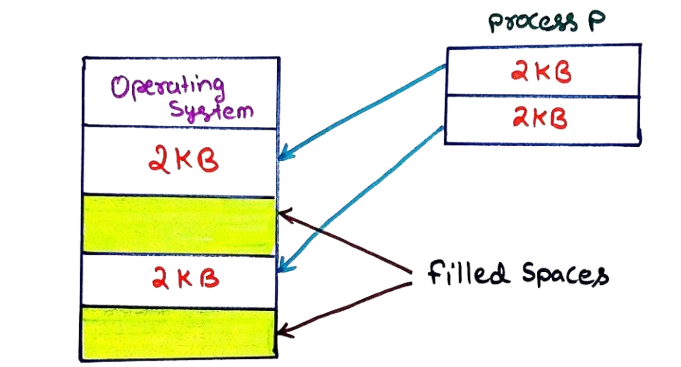
In the diagram:
- The Operating System is already using some parts of memory
- Some memory spaces are already filled (shown as colored blocks)
- A new process P requires 4 KB of memory
- Instead of placing it in one place, it is divided into two parts of 2 KB each
Memory Protection
Memory protection ensures that processes access only their allocated memory using hardware and software mechanisms.
Advantages of Memory Management
- Efficient Utilization of RAM: Memory management ensures that available main memory is used optimally without unnecessary wastage.
- Improved System Performance: Proper allocation and deallocation of memory reduce delays and allow faster execution of processes.
- Supports Multitasking: Multiple programs can run simultaneously by sharing memory efficiently.
- Prevents Memory Overlapping: Each process is given a separate memory space, avoiding interference between programs.
- Enhances System Stability: Controlled memory access reduces system crashes and unexpected behavior.
- Improved Security: Memory protection mechanisms prevent one process from accessing another process’s memory.
- Supports Virtual Memory: Allows execution of large programs even when physical memory is limited.
Conclusion
Memory management plays a vital role in the performance and reliability of an operating system. By using techniques such as paging, segmentation, and virtual memory, the OS ensures optimal utilization of limited memory resources.